Showing posts with label Shoreline. Show all posts

Sunday, March 28, 2010

Pacific Sunset Step Two

Pacific Sunset Step Two
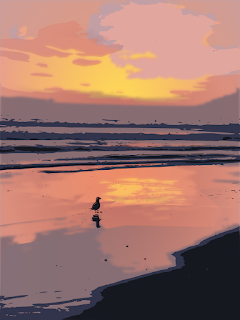
The painting turned out nicely. The two-step process involves laying out the shapes, basic contrasting colors and values in the first step and saving that work as an image. Then, in the second step, painting on top of that imported image goes smoothly and quickly. Refer the the post of step one to see where I left-off in step one.

You may download the SVG source in xml format of step two of this painting from Google Docs.

I have also used this two-step process successfully to paint falling water in in a mountain stream.

Saturday, March 27, 2010

Pacific Sunset Inkscape Painting

This work in progress represents the first step in a new, two-step process with which I am experimenting using Inkscape 0.47. I have painted the basic areas in this first step. I will paint on top of this base image in the second step.

Inkscape can be quite memory intensive, so once I have nine or ten layers, each composed of gradients and filters, adding strokes or applying effects can take time waiting for the processor on my old PC to finish swapping. Moving parts of one layer to another layer, across too many layers, can be even more memory intensive. So this experiment will involve taking the painting to a point that satisfies me and upon which I can build. I will then export the work as a PNG, just as I have in for this post. This first step took less than one hour to paint. I mostly painted with a thin brush and then clipped the resulting shape from a rectangle so that the color below would show through the shape that I left unshaded in the top layer. Occasionally, I colored the shape and added it alone as a new top layer.

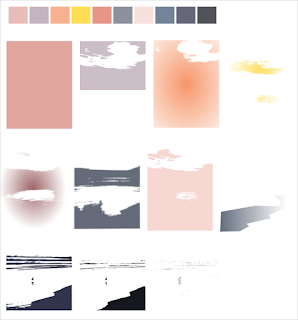
You can see the layers and palette that I used in the first step. The base image is build up in layers which are shown below.
layers step one
The background is on the top at the left while the foreground in in the bottom right. The image is made by stacking and aligning the layers row-by-row, from top to bottom and left to right. The palette also shows the order.

In the second step, I will import that PNG, add layers on top of the flattened image, and finish off fine points with brush strokes and filter effects.

The photo upon which this painting is based was released in the public domain. See the brilliant original entitled Pacific sunset by Andrew Schmidt.

Monday, October 12, 2009

Study of hills and water inlet

inlet version two

The new version above is improved over the original below. This might be close to finished.


="inlet

The foreground and background still needs work in this study based on a photographic of Akaroa harbour by mollivan_jon on flickr. I have used Inkscape filters new to version 0.47 to paint the light and reflections to my satisfaction.

Akaroa on Wikipedia

If you refer to the original, you will see that I took gross liberties as far as composition of the paitning is concerned, but my intention was to focus on the shapes and the light and shadows on the hills as well as experiment with reflections on the water.

Saturday, May 23, 2009

Creating a shoreline in Inskcape using a photograph as a model

My incomplete project:


sailboat

The purpose of the demonstration:


To show how to use layers and sections of photographs as models for creating landscapes using Inkscape.

Tools used to create the landscape background:

  • Inkscape 0.46


The intended audience and required skills:


Intermediate Inkscape users: familiarity with Potrace, with editing linear gradients, with duplicating shapes, practiced at using gradients for shading and lighting effects, drawing Bezier paths, clipping shapes, and exporting selections to PNG.


How to begin making a landscape background using Inkscape 0.46.


shoreline

Helpful Resources:


The photograph from which this study is derived is by http://www.flickr.com/photos/chefranden/ and may be seen on Flickr.